

Let’s start with the TL;DR:
- Developers want to track time by the hour.
- Clients prefer a fixed price for a specific result.
- Why developers like the Pomodoro Technique.
- Slack Work Sessions are a novel method for Developer Time Tracking.
- Management tips for approving Slack work sessions.

If you are interested, keep reading:
So, you’re convinced that hiring remote talent is best thing you can do for your company and the world. But you’re unsure about fixed price vs hourly payment. This article shares a new method, slack-based developer time tracking. This method can make your distributed team extremely effective.
About the Author: Gobi Dasu is the founder of ldtalent.org and a CS PhD Student at Northwestern University. He holds a BS and MS in Computer Science from Stanford University. Born out of a masters research project, LD Talent (“Learning Dollars Talent”) is a network of software engineers financially incentivized to engage in lifelong learning.


1. Developers want to track time by the hour.


1.1 Why Developers want to track time by the hour:
Developers like to track time by the hour because they know that:
- You can’t predict how long a specific programming task or bug fix will take.
- Time estimates are almost always underestimates.
- Multiplying estimates by some constant (like 2 or 3) doesn’t work either because:
- Sometimes things are simple and take orders of magnitude less time.
- Sometimes things take an order of magnitude more time, i.e. nasty bugs.
- Software development is an iterative, agile process. It requires a constant negotiation between users, designers, product owners, and developers:
- For instance, sometimes a feature might take months to debug. In those cases, teams often find it better to change the design or find workarounds.
- Design and product teams get feasibility feedback from engineering teams.
- Engineering teams get feedback on their implementation from product teams, and that can affect timelines.
These circumstantial and organizational factors affect developer time tracking. They push developers to prefer hourly pay over fixed price.
In fact, clients often let developers track hours, rather than commit to a fixed price sum. This is because fixed price contracts can end in below par delivery and project abandonment.


1.2 Top Developer Time Tracking Softwares
A google search of “developer time tracking” yields tracking-by-the-hour services like:
- Clockify – it’s free and allows you to start and stop tracking time.
- Timecamp – includes productivity reports and lots of integrations with project management software (i.e. Trello, Asana).
- Harvest – emphasizes analytics and insights on developer time tracking.
- Toggl – is a well designed modern tool. It emphasizes hassle free time tracking, but its fundamentally similar to the rest.
- Hours – is a native MacOS, iOS, and watchOS application that helps developers track time.
- Tickspot – focuses on treating time like “inventory”. It helps managers assess the monetary value of a developer’s time tracked.
- Memory.ai’s Timely – focuses on using AI to free developers from needing to prepare time sheets. The AI automatically observes the screen and makes the time sheet
- TrackingTime – has good cross-platform support — it supports iOS, Android, Mac, and Windows
- PayDirt – is an interesting name which can be misinterpreted unless you know the North American term, which refers to Gold Rush soil. Otherwise, no differentiation.
- TSheets – is an interesting time tracking software. It focuses on a clean integration with employee payroll software. Intuit Quickbooks acquired it recently, and I had the privilege to meet its founder Matt at DisruptSF 2019.
- Desktime – no differentiation.


1.3 Time Tracking Softwares that are also Talent Marketplaces
- Hubstaff – works on Desktop and mobile.
- It lets you blur screenshots taken every 10 minutes of work which is a good security measure. Nobody wants secret credentials showing up on Hubstaff servers in screenshots.
- It also has affordable international talent, though not vetted.
- Upwork Time Tracker – is very famous since Upwork is a large freelancing markeplace. It essentially works the same way as the rest of the softwares:
- It takes random screenshots every 10 minutes.
- I remember the CEO of Elance-ODesk (now Upwork) Gary Swart describing Upwork Time Tracker at the Stanford GSB. He mentioned how this system is awesome because it lets freelancers rip out any time they don’t want to bill for.
In summary the technologies listed facilitate developer time tracking by the hour. However, these services take frequent screenshots of a developer’s computer and invade their privacy.
Also, clients don’t actually have the time to verify the screenshots!
2. Clients want to pay a fixed price amount for a specific result.
A google search of phrases such as “developer time tracking” and “fixed price vs hourly” reveals that:
Clients often come into a project wanting to pay a fixed price for a result. This attitude comes about because:
- They think the amount of time a software project will take is predictable.
- They don’t know that some bugs can take forever to crack and others less than a minute.
Upwork clearly lays out the pros and cons of fixed price vs hourly:
- Fixed price is for short term projects.
- Hourly is for long term ones.


Now other sources say specific things about the fixed price vs hourly conundrum but much of what is debatable:
2.1 Memory.ai’s Timely says that hourly rates are better for unstructured, on-going projects. They cap earnings and punish efficiency. Why we disagree:
While this theoretically makes sense for some disciplines, this makes no sense for development, which often is not predictable.
Ask 10 developers and 10 out of 10 will tell you that every client project is unstructured and ongoing.
Clients always have some change or addendum because of the way agile software development works. It’s iterative and based on user feedback.
Moreover, writing good quality code with continuous integration and tiered production environments is complex work.
It is not a transcription microtask which can be finished in a predictable amount of time. It requires thought and nuance. The only real way to hire serious developers is to pay by the hour.
Product managers and developers almost always underestimate how long it takes to build a complex project. So, hourly payments “capping earnings” and “punishing earning” should be the last of concerns for developers. Gregory Ciotti and Kellogg explain that people are horrible at predicting their future productivity.
Managers would ideally like to pay for a result rather than by the hour. However, stringing along a developer toward a fixed reward (that is taking longer and longer to achieve) is exploitation. It doesn’t work, especially in a seller’s market.


2.2 Small Business Cron mentions that choosing fixed price can be “either the best or worst choice for the freelancer”. Why we disagree:
In the case of software development or any technical work, it’s most definitely the worst choice.
As a software engineer, developer, or data scientist, you should expect the following scenario described by Small Business Cron: “The client may not like the work or need additional changes and revisions that can add hours — or days — to your schedule. If a fixed price project escalates, or if issues complicate the job, you could lose time and money.”


2.3 Shabbir Bhimani of imtips.co recommends that developers go for fixed price by default. Why we disagree:
Shabbir Bhimani recommends that developers choose fixed price by default … unless the task is unstructured. His main arguments are that it makes it easier for clients to know what they’re committing to. It also makes it easier for engineers to get a role. Moreover, fixed price contracts incentivize engineer productivity.
In reality clients lose money and developers lose time, when using fixed price. This is because creation of software is a continuous development process.
Clients lose money with fixed price because they need to keep adding bonuses and fixed price awards to keep engineers motivated enough to solve that last bug, make that last tweak, or iterate on that last feature. Under intense time pressure, clients either splurge or lose the developer and only partially complete work remains.
Developers lose a lot of time with fixed price contracts. They always think they can get something done in a certain amount of time. Then, they run into the reality of bugs or imperfections in 3rd party libraries. They had lowered their estimates to get the gig in the first place. But now they are lethargic and frustrated with what seems like a moving target. It gets to the point where they are no longer working toward a compensation that seems worth it. They realize their sunk cost.
In summary, both developer and client are being unrealistic if they go for fixed price. Fixed price development ends up being a waste of time and money for both parties.


2.4 CodementorX warns about developers flying through work fast and dirty in the fixed price setting. It extols hourly payment for its adaptability to customer feedback and agile development. Why we mostly agree:
We agree mostly as we’ve found that developers do a much better job when they are relaxed and thinking clearly. When you put a lot of pressure on them to finish a project for $X, they end up calculating how fast they need to go. They cut corners to get there. Software development is a high investment, high return type of activity. It’s not cutting cookies by any means, where you can hire minimum wage labor to crank cookies out at a specific rate. Coding is complex work, and you’re building a scalable product. So, it’s better to optimize for the product development experience of the developer and client.
We endorse hourly over fixed price, any day. Even though there are tracking solutions such as Toggl or Upwork Time Tracker, we prefer a more modern and integrated solution in Slack. To understand this solution, we first need to understand the Pomodoro technique.
3. Why developers like the Pomodoro Technique


Introduction to the Pomodoro Technique
The Pomodoro Technique is a simple time management system developed by Francesco Cirillo. It works in the following way:
- Choose a task you want to get done. Write it down.
- Set a timer for 25 minutes.
- Work on the task for 25 minutes without interruption (not even going to the bathroom).
- Rest for 5 minutes.
- Every 4 pomodoros rest for 20 minutes.


3.1 Why developers like the Pomodoro technique
Some reasons why developers like the Pomodoro technique are:
- It requires you to plan before jumping into code. For instance, you have to decide which files you’re going to look into or what things you’re going to try. It prevents you from fiddling around randomly.
- It helps you quantify how much of your time is devoted to writing code, testing code, communicating with colleagues, figuring out documentation, researching on StackOverflow, etc.
- Some developers choose 50 minute pomodoros with 10 minute breaks because it gives them more time to get into flow. Personally, I still prefer 25 minute ones because it helps me see clearly how a complex coding problem can be broken down into simple subproblems. This is an important advantage. When I’m stuck, wondering why my application is not working, I am forced to keep asking myself “why” until I have a concrete “thing to do”. That “thing to do” could be as simple as logging a variable.
- It guards against Parkinson’s law which says that work expands to fill the time you allocate for it. That time ticking down psychologically forces you to push for a nice finish to the task at hand. Even if you achieve a sub-milestone to what you planned for, it’s still nice to know that you did something in each half hour chunk. This is particularly useful because it helps you avoid going down debugging rabbit holes. Instead, it helps you focus on the most important insight you want to gain in the next 30 minutes of programming.
- It enforces periodic reflection every 25 minutes. Reflection is very important in software engineering even if it seems like a waste of time. Metacognitive reflections let programmers evaluate whether the path they’re going on is worth exploring, or whether there’s a better path to explore.
3.2 Developer Criticisms of the Pomodoro Technique and How to Address them:
Yet other developers have criticized the technique but most of the criticisms are easily addressable, as discussed in sections 3.3 and 3.4.


3.3 Flow State and the Pomodoro Technique
Florian of codinginflow.com writes that the pomodoro timer interrupts flow. “25 minutes doesn’t give you much time to enter into flow. I think that a simple solution is to change your pomodoro to however long you need. 1 hour with a 20 minute break or 1 hours with a 30 minute break.”
I personally think that pomodoro breaks flow by design. And this is actually good for many software engineering situations. Often we go down a rabbit hole of trying one solution or another. We don’t look back at the big picture of whether what we were working on in the moment was even worth it. For instance, say you can’t get AWS Elastic Beanstalk to work for your application. Instead of staying in flow for 4 hours to fix it, it might have been smarter to just try deploying to Heroku. The latter only takes 30 minutes to get right and offers the same service.


3.4 Deliberate Practice and the Pomodoro Technique
Software Meadows doesn’t recommend short pomodoros for coding. It argues for a deliberate practice of a 50-minute work session with a 10-minute break. I think this is great for many people, but I personally think the more granular the better. Often we plan out big tasks but really they are just subtasks. For instance, scraping a site involves
- reading the sites source code
- deciding whether you want to use beautifulsoup or python selenium
- getting the scraper to open the site and extract the html data
- iterating though the data
- storing specific data in certain data structures
- saving said data structures to a database
No matter what you’re working on, you can engage in task visualization (TV). You just have to visualize yourself doing the task and detail all the things you might need to do. You can keep breaking down tasks into subtasks, until you hit the minimum possible subtask (MPST). The MPST is defined as the subtask beyond which you’d need to start doing research and the actual work to figure out what’s involved. TV and MPST are concepts developed here at LD Talent, but they go hand in hand with Francisco Cirillo’s Pomodoro Technique. For instance, you can use the pomodoro breaks (5 minutes) to relax but also reflect and visualize yourself doing the next set of work (TV). You can use the pomodoros (25 minutes) to complete an MPST.
Slack Worksessions
4. Slack Based Work Sessions are a novel method for Developer Time Tracking, inspired by Pomodoro.
4.1 Slack Based Time Tracking
Coordinating a globally distributed remote software team can pose some communication and trust related challenges. One solution is to use Slack-based 30 minute work sessions:

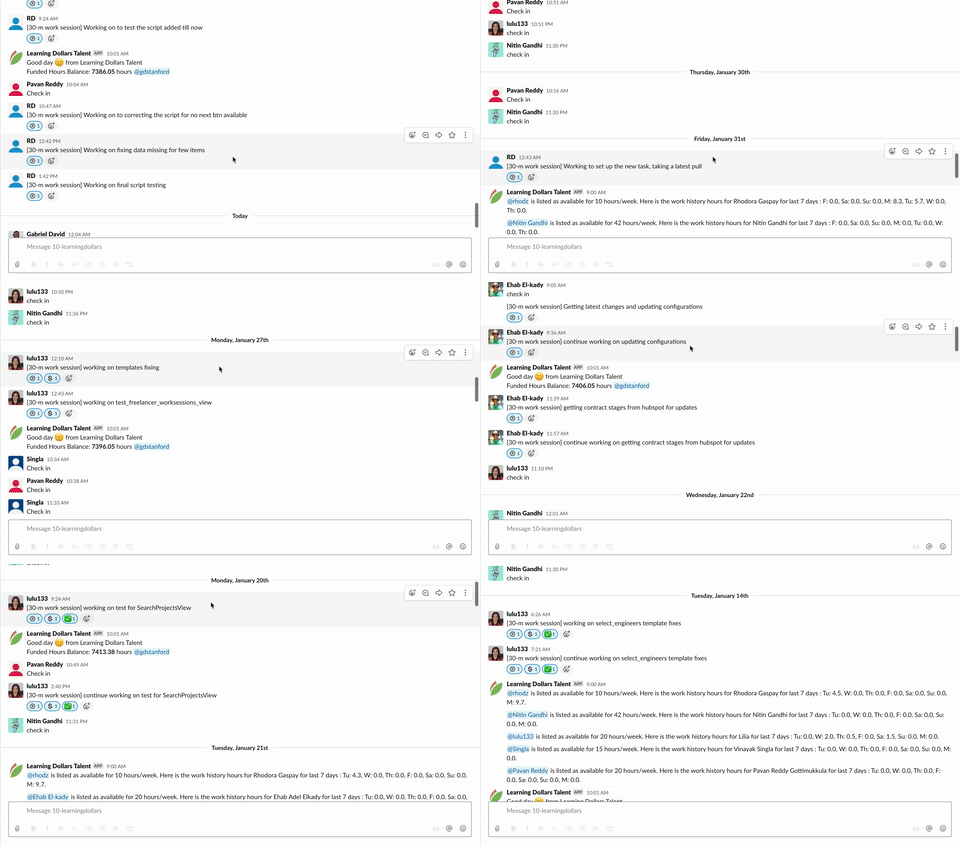
Note, engineers can time track 30 minute work sessions. But, the system only releases funds when clients or engineering managers approve them. Before approving work sessions, managers should check associated git commits or visual application updates. This system lets engineers express clearly what they worked on and justify their time. But, it also makes sure management is always happy, since they only pay for high quality work that they are satisfied with.
You can see Slack based time traction in action with this offer for 5 free hours of coding and these details.


The reason we have developers time track 30 minutes is significantly based on the Pomodoro Technique described above.


When a work session is registered in our database our slackbot reacts ®. When the client approves the work session a 💲react appears. And when the developer is paid by the platform a ✅ appears.
4.2 Why Slack-based Time Tracking Satisfies Upwork’s 3 Heuristics for Radically Transparent Distributed Engineering Teams
It’s interesting because that version of time tracking satisfies 3 heuristics that Upwork’s Senior VP of Engineering Han Yuan recommends:
- Building teams is not like being an engineer: you are creating a structure of people, not a website. This point emphasizes setting standards and mentorship. Engineering managers set standards for what constitutes good work sessions (i.e. a tangible git commit). They approve / reject work sessions based on preset criteria. This makes mentorship and feedback from the team leader to engineers very real and impactful.
- Written communication is fundamental in a distributed engineering team. Often engineers say they’re working on X and it took Y hours. But, it’s very hard for team leaders to manage vague descriptions. [30-min work sessions] make what a developer is working on very transparent to the team leader. Moreover, it incentivizes developers to write descriptive work sessions. This is because developers get paid entirely based on their work sessions and associated git commits. This further encourages fanatical transparency. Everyone is saying what they are doing in slack, so everyone is on the same page — from developers to team leaders to designers.
- Delegation enables scaling. You can never scale a team if you are micromanaging each developer. By using slack work sessions, you never have to ask how’s it going or what are you working on. You, the team leader, get a continuous stream of information of what’s taking a while and what’s getting done quickly. And you can step in and diagnose issues when you need to.


4.3 Tips for Developers on How to Track Time (Trust!)
We now present some tips that we send to developers who are new to Slack-based work sessions. These tips are for making sure that developers get paid but also satisfy their clients’ needs. The balance is important for a successful relationship:
- establish in the interview whether your client seems reliable and seems like someone you want to work with
- don’t track work sessions until your client confirms explicitly that you should begin tracking work sessions and that they will be approving the work sessions
- only track a few work sessions at a time but make sure they always contain an incremental but tangible deliverable (git commit, visual app update)
- gauge whether your client is reviewing and approving your work sessions
- respectfully remind your clients to review and approve your work sessions
- seek feedback so as to maximize client satisfaction and minimize disappointment due to unapproved work sessions
- make sure that you don’t collect too many unreviewed work sessions
- it is your responsibility to ensure that there is a trust relationship between you and your client
By strategically tracking tangible and quality work sessions, and understanding a client’s requirements and approval process, a successful engineer will be able to maximize their earnings and minimize their lost or disapproved sessions.
Some more tips on establishing trust:
- Remember to ask your clients for feedback on how you’re doing. Ask every week. This is to make sure you’re in good standing. It’s better to ask feedback periodically than be told feedback when it’s too late.
- Some times you may feel unwell. Other times you may be unable to work due to an emergency. This is understandable.
- In such cases, the absolute best thing you can do to retain your clients is tell them in the project channel something like this:
- “Hi [client], I am not feeling well and need to be away for [N number of] days.”
- If you need more time after N days then just shoot them another similar message.
- Please don’t simply stop responding without informing the client that you’ll be away.
- Even in tough times, it’s not difficult to send a short message.
- or even ask someone near you to login and send it for you
- This way clients are not left hanging and you get sufficient time off to be healthy.
- Employers and clients sometimes can have a hard time describing what they need. It is your responsibility to:
- ask them appropriate questions
- find out exactly what they want before building
- create a list of detailed subtasks
- estimate for the client how long each task will take
- before proceeding to develop
- It’s important to be proactive with clients, especially if you are a freelancer.
- Make sure to ask for work to show you are interested.
- If you use slack chat, tag the client in each message.
- If the client sees you as unresponsive or uninterested the project may not progress.
- If they see you as proactive and interested, they may give you more opportunities.
- First impressions are the strongest, especially during the interview and new hire stage.


5. Engineering management tips for approving Slack work sessions.

In order to get the most out of Slack-based developer time tracking, it’s important to:
- set standards for what constitutes a good 30-min work session
- enforce those standards by approving good work sessions
- enforce those standards by rejecting poor work sessions and giving feedback
In order to help tech team leads and clients do this, we send the following tips to them every month:


5.1 Engineering Management
If you’re not doing so already, to ensure code quality and save time, please encourage your engineers to use:
- DevOps and continuous integration (a build-test-deploy pipeline)
- linters for all programming languages used
- unit tests
- end2end tests (i.e. browser automation, appium, etc.)
- package management (for backend and frontend)
- logging software
- a dev testing environment (to make sure features actually work!)
- a protected prod server
- peer code reviews on github
- create a github wiki style guide for your peer review process


5.2 Heuristic Questions for Peer Code Reviews
We recommend all tech teams maintain a github wiki. The wiki should have certain heuristic questions, best practices, and rules to check during code reviews. We recommend blocking pushes into master until at least 3 team members approve a pull request (PR). During the peer review phase, we recommend that the 3 team members go through the project’s “wiki rules” and make sure the PR’s diffs respect them. In the project’s github wiki:
- You should have heuristic questions to make sure:
- new files pushed are necessary
- model changes will not break other parts of the codebase
- committed code contains no passwords or secrets
- You should include best practices, design standards, syntax preferences, and coding conventions for important files like models, views, controllers, urls, visual templates, and even tests themselves.
- think scalability, maintainability
- template checking should include bootstrap and form validation
- You should have recommendations for:
- good file structure of the codebase
- codebase documentation
- test coverage
- choices of architecture, design patterns, code recipes, idioms, clean abstraction, data structures, regex, IDE, debugging tools, and 3rd party APIs given your project’s domain, framework, and languages
- weighing tradeoffs of different architectures
- how to search google, stackoverflow, and documentation, specific to the languages and frameworks of your project
- You should have security rules protecting against injection, cross site scripting, brute force attacks, encryption, and other famous types of attacks.
Please research into any of the above terms and techniques you don’t know, as they are very useful.
We recommend against approving work sessions until you’ve done quality checks like those described above.


5.3 Project Management Tips
A reminder on techniques for effectively managing engineers from the LD Talent Client FAQ. This includes techniques for proper time estimation for deadlines, achieving high work quality, etc. Techniques address:
- breaking down tasks into subtasks on trello
- asking engineers to estimate hours for tasks (not doing it yourself)
- requiring github commits for every few work sessions
- making sure you control the github repo
- ensuring that the repo is kept up to date by engineers
- so if an engineer has to be replaced, the new one can pick up where the last one left off
- maintaining engineer responsiveness
- making sure engineers meet deadlines and expectations
- making sure you’re not dependent on one single engineer
- you don’t want all eggs in one basket
- but you also want to stick to budget
- ensuring code is clean, documented, linted, unit-tested, e2e-tested, peer-reviewed, tested on dev, and continuously integrated
Please spend 10 minutes reading through the FAQ to save weeks of time and thousands of dollars on work sessions.


5.4 Tips for Managing Remote Engineering Teams
Hi clients, are you doing all of the following?
These checklists could mean the difference between the success or failure of your team. It is compiled from the following fully distributed companies:
- Zapier Inc.
- Slack Inc.
- Github Inc.
- Gitlab Inc.
- Buffer Inc.
- Automattic Inc. (WordPress)
- Invision Inc.


Checklist for Hiring Doers
- embrace the fact that the sun never sets on your company
- and that remote work is a more efficient and effective way of working
- hire doers
- “Doers will get stuff done even if they are working from a secluded island.”
- It’s better to interview many but hire the best.
- have an interview question specifically designed to making sure you’re hiring a doer
- hire people you trust and trust the people you hire
- only keep people in your team if you trust them
- hire people who can write
- don’t compromise on the strictness of continuous integration and code review guidelines
- and the standards for approval of work sessions
- don’t let engineers burn out
- assign one or two tasks at a time
- but be transparent by laying out all tasks in a trello board


Checklist for Coordination
- Security measures:
- use password managers (i.e. we use Dashlane)
- create a tiered code permissions structure and a development environment
- this is so remote engineers can contribute, while minimizing the number of devices in the world with access to:
- your server
- access tokens
- production secrets
- For each engineer you hire to build features, hire a QA engineer to test their work before you approve either of their work sessions.
- Make sure you’re a power user of slack, trello, github, drive, mockup software, google cal, password managers, hellosign, and worldtimebuddy.
- Use asynchronous slack communication for status updates. Schedule status updates at a mutually timezone convenient “check in” time.
- If you have to use calls, use them to develop team culture. Culture is critical for preventing attrition. Ice breakers are a great start.
- Set expectations and standards early.
- i.e. for work session approval or check in punctuality
- Send google cal invites for any important events.
- Develop shared company values, lingo, a mission statement, motto, and style.


Checklist for Culture
- For each candidate engineer, have one interview question dedicated to the following soft skills:
- self-discipline
- communication skills
- organization skills
- teamwork skills
- focus skills
- transparency
- documentation skills
- commitment
- Have an existing engineer be responsible for helping onboard a new engineer.
- Make sure every team member knows they are an integral part of the team, regardless of geographic location.
- Consider having all team members do a little bit of customer support, esp. in smaller teams.
- Create a culture of shipping code. But, let engineers set time estimates. Gauge them by how well they can meet their own goals
- Give feedback frequently on git commits.
- Celebrate success with the distributed team.
We hope these tips help tech teams and clients get the most out of every: interview, hire, git commit, and work session time tracked.
